What and why of a Webhook?
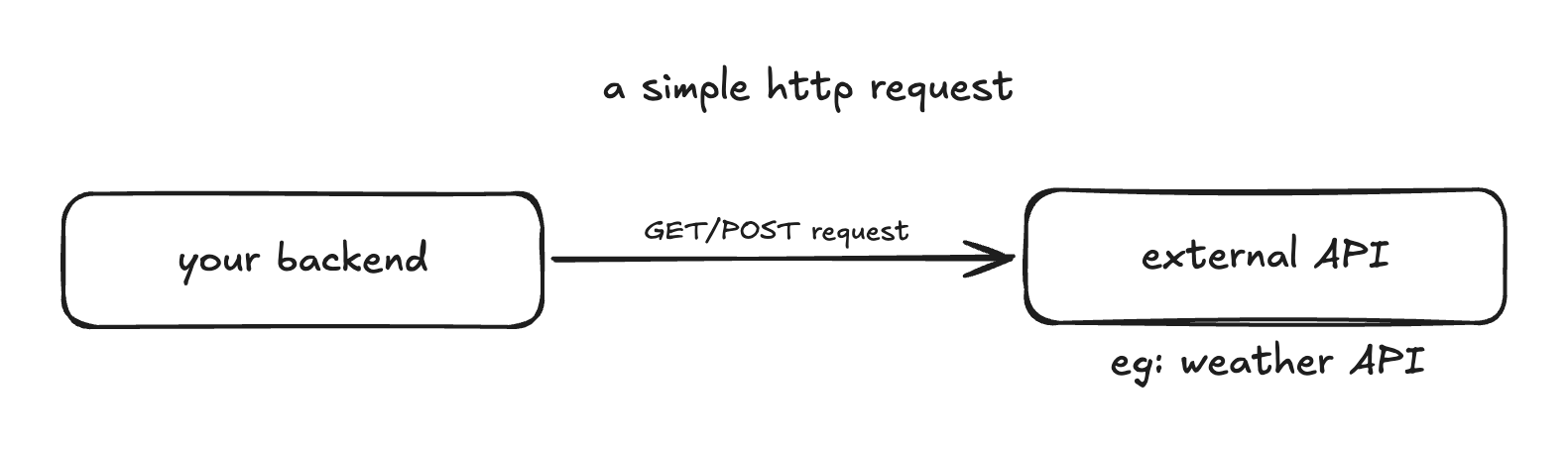
When your backend sends a request to an external endpoint, that is a simple request sent to GET some data or to POST some data.
Let's say you are working on payments, and want to know when a customer's payment is complete, so you can confirm the order. But you do not know when this will happen. It can take a few seconds or a few minutes.
So you write a while loop or a setTimeout that is requesting the external service every 1 minute to check if the payment for a customer is done or not. This repeater requesting to an external endpoint over an interval is called polling.
Polling works, but it has problems:
- Most calls are wasted, because the answer is "No" most of the time.
- If the payment completes just after a check, you wait almost one full minute to find out if your payment was done or not.
- If you start checking every 1 second instead of every 1 minute, you are wasting a lot of compute and adding extra load.
- The payment provider may block your backend for a large number of repeated requests.
The solution for this problem is a Webhook. Here, the payment service itself tells your backend when a payment is complete.
Here's how a webhook works in layman's terms:
- You provide your own backend endpoint to the payments service. The provider service stores this endpoint. You have now registered an endpoint (
eg: /webhooks/payments) on your backend with the service. - Next, we tell the service which event we want to know about. In this case, a
payments completedevent. - Now whenever this event occurs, the external service will send a POST request to our backend endpoint saying this customer's payment is successfully done.

Hence, a webhook is an HTTP request that a service sends to an endpoint you registered, when a specified event occurs.
- Requests
- 1
- Wasted
- 1
- Detection delay
- Pending
Customer
checkout
Stripe
waiting
Your backend
/api/v1/payments
- t=0s
1GET statusGET /v1/payment_intents/pi_123
200 · not paid yet
Poll #1: payment still pending
t = 0s · Your backend → Stripe
Your backend asks Stripe for the payment status on a fixed 60 second timer. The customer has not paid yet, so the answer has nothing new.
GET /v1/payment_intents/pi_123
→ 200 { "status": "requires_payment_method" }
There are two fronts on which you will deal with webhooks:
- When you are integrating them into your application.
- When you are building the actual delivery service.
I've worked on both in a real production environment. I'll try to give you a rough picture of the entire system design.
Integrating a webhook in your application
Let's say we are integrating payments into our system and the provider we are using for this is stripe. Stripe is one of the biggest players here and a company I would want to work at.
Here's how we would do this:
- SStripe
- Public endpoint
- Verify
- Idempotency
- Ordering
- Respond
Step 1 · Public endpoint
Create a POST route such as /api/v1/payments/stripe, then add its full URL to Stripe's webhooks dashboard.
Pick a scenario or press Send event
1. Your public POST endpoint
To accept webhooks you obviously need a public endpoint to which an external service can send data. So we create an endpoint such as /api/v1/payments/stripe.
We add this URL https://<your-backend-host-url>/api/v1/payments/stripe to Stripe's webhooks dashboard.
2. Verification
Since the endpoint is open, anyone can send data to it if discovered, so we need to have a security check between you and your webhook provider. This is usually done by an HMAC key which would be present with you and Stripe and helps you accept legitimate data.
3. Idempotency and duplicate handling
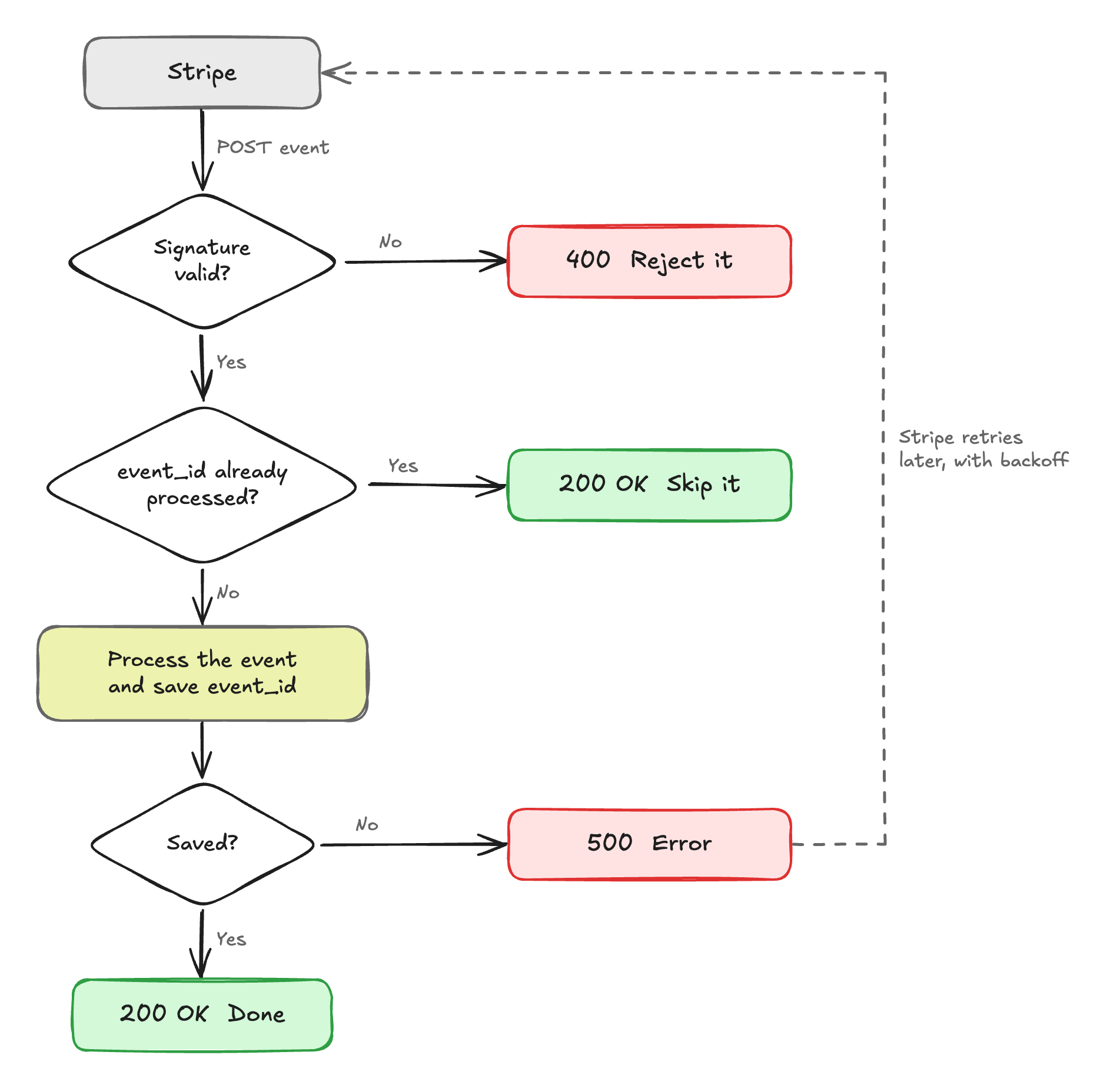
Stripe guarantees to send an update atleast-once, meaning the same event could be sent twice as well. But if you get a payment-done event twice, that doesn't mean you should give twice the subscriptions to your user. You need idempotency.
Idempotency is when you process the same event two times, the result must be the same as processing it one time. For Stripe events, we can track event_id which Stripe sends with each event and we can check if it already exists in our database or not before processing.
4. Event ordering
You can never assume that event A will arrive before event B. A subscription.updated might arrive before subscription.created and you should be able to handle these cases.
5. Responding to the webhook provider
When you receive a webhook event, then you should send a 200 OK to the provider so that they don't resend you the same event and move on to the next one. If we don't receive an event, we should send 400/500 so that the provider can retry.
These are some important concepts to remember when integrating webhooks into your system.